In today’s fast-paced digital world, your iPhone can be much more than a communication device. With the right productivity apps installed, it can become your personal assistant, project manager, note-taking device, and even your AI-powered work companion.
Whether you’re a student, entrepreneur, remote worker, content creator, or business owner, choosing the right productivity apps can save hours every week and help you stay organized.
In this guide, we’ll explore the best iPhone productivity apps in 2026 that are helping millions of users work smarter, stay focused, and achieve more.
Why Productivity Apps Matter
Modern productivity apps help users:
✅ Manage daily tasks
✅ Organize schedules
✅ Improve focus
✅ Collaborate with teams
✅ Automate repetitive work
✅ Take smarter notes
✅ Track projects efficiently
The right apps can significantly increase efficiency while reducing stress and workload.
1. Notion
Best For:
All-in-One Workspace Management
Notion continues to dominate productivity rankings in 2026.
With Notion, users can:
- Create notes
- Manage projects
- Build databases
- Track goals
- Organize business operations
- Store documents
Key Features
- AI-powered writing assistance
- Team collaboration
- Project dashboards
- Task management
- Knowledge bases
Pros
✔ Highly customizable
✔ Excellent for businesses
✔ Powerful AI integration
Cons
✘ Learning curve for beginners
2. Microsoft To Do
Best For:
Task Management
Microsoft To Do offers a clean and simple way to manage daily responsibilities.
Features include:
- Daily planning
- Reminders
- Task categories
- Shared task lists
- Cross-device synchronization
Perfect for students, professionals, and business owners.
3. ChatGPT
Best For:
AI Productivity and Content Creation
AI has become an essential productivity tool in 2026.
ChatGPT helps users:
- Write emails
- Generate reports
- Brainstorm ideas
- Create content
- Summarize documents
- Learn new skills
Many professionals now use AI daily to complete tasks faster and improve work quality.
Popular Uses
- Business writing
- Customer support responses
- Research assistance
- Social media content
4. Google Keep
Best For:
Quick Notes and Reminders
Google Keep remains one of the easiest note-taking apps available.
Users can:
- Create checklists
- Record voice notes
- Save images
- Set reminders
- Organize ideas
Its simplicity makes it ideal for busy individuals.

5. Trello
Best For:
Project Management
Trello uses a visual board system that helps teams organize projects effectively.
Ideal for:
- Freelancers
- Agencies
- Startups
- Students
- Remote teams
Key Features
- Drag-and-drop task cards
- Deadlines
- Team collaboration
- Workflow automation
6. Google Calendar
Best For:
Time Management
Google Calendar remains one of the most effective scheduling tools available.
Benefits include:
- Meeting scheduling
- Appointment reminders
- Shared calendars
- Event notifications
- AI-powered scheduling suggestions
A must-have app for busy professionals.
7. Evernote
Best For:
Advanced Note Organization
Evernote is designed for users who manage large volumes of information.
Features include:
- Document scanning
- Rich note formatting
- Web clipping
- Notebook organization
- Cross-platform synchronization
Ideal for researchers, educators, and business professionals.
8. Forest
Best For:
Focus and Reducing Phone Distractions
Forest uses a unique approach to productivity.
You plant a virtual tree that grows while you stay focused.
If you leave the app to browse social media unnecessarily, the tree dies.
This simple concept has helped millions improve concentration.
9. Slack
Best For:
Team Communication
Slack remains one of the leading collaboration platforms.
Teams use Slack for:
- Messaging
- File sharing
- Project discussions
- Department communication
- Integration with productivity tools
A valuable solution for remote work environments.
10. Grammarly Keyboard
Best For:
Professional Writing
Grammarly helps improve:
- Emails
- Reports
- Blog posts
- Social media content
- Business communication
Features include:
- Grammar correction
- Tone detection
- Writing suggestions
- AI rewriting assistance
Excellent for professionals and content creators.
11. Dropbox
Best For:
Cloud Storage
Dropbox makes file access easy across devices.
Benefits include:
- Automatic backups
- Secure storage
- File sharing
- Collaboration tools
- Offline access
A reliable cloud storage solution for work and personal use.
12. Shortcuts
Best For:
iPhone Automation
Apple’s Shortcuts app allows users to automate repetitive actions.
Examples:
- Auto-send messages
- Launch multiple apps simultaneously
- Create custom workflows
- Generate automated routines
One of the most powerful built-in productivity tools on iPhone.
13. TickTick
Best For:
Task Planning and Habit Tracking
TickTick combines:
- To-do lists
- Calendars
- Pomodoro timers
- Habit trackers
This makes it a comprehensive productivity platform.
14. Canva
Best For:
Content Creation
Canva allows users to design:
- Social media posts
- Flyers
- Presentations
- Logos
- Marketing materials
Perfect for entrepreneurs, students, and marketers.
15. Spark Mail
Best For:
Email Productivity
Spark transforms email management with:
- Smart inboxes
- Email prioritization
- Scheduling
- Collaboration features
- AI-powered organization
Ideal for users handling multiple email accounts.
Best Productivity Apps Comparison Table
| App | Best For |
|---|---|
| Notion | All-in-one workspace |
| ChatGPT | AI assistance |
| Google Calendar | Scheduling |
| Microsoft To Do | Task management |
| Trello | Project organization |
| Slack | Team communication |
| Grammarly | Writing improvement |
| Forest | Focus enhancement |
| Canva | Content creation |
| Dropbox | Cloud storage |
| Spark Mail | Email productivity |
| TickTick | Habits and tasks |
Productivity Tips for iPhone Users

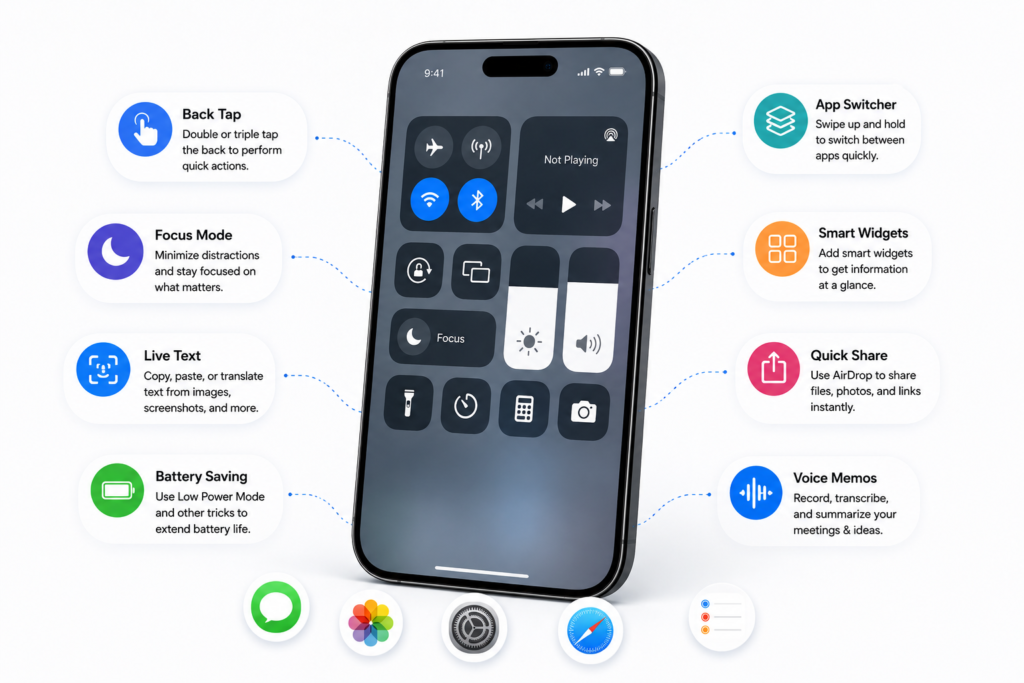
Use Focus Mode
Reduce distractions while working.
Automate Tasks
Leverage Apple’s Shortcuts app.
Organize Notifications
Disable unnecessary alerts.
Use Widgets
Access important information without opening apps.
Review Tasks Daily
Spend five minutes each morning planning your day.
Frequently Asked Questions (FAQ)
Which productivity app is best overall in 2026?
Notion remains one of the most comprehensive productivity platforms available.
Is ChatGPT useful for productivity?
Yes. ChatGPT helps users save time through writing assistance, research, brainstorming, and automation support.
Which app is best for task management?
Microsoft To Do and TickTick are excellent options for managing daily tasks.
What is the best productivity app for students?
Notion, Google Keep, and Google Calendar are highly recommended for students.
Are productivity apps free?
Most offer free versions with optional premium upgrades for advanced features.
Conclusion
Your iPhone can become a powerful productivity machine when equipped with the right apps. Whether you need better organization, improved focus, smarter note-taking, AI assistance, or project management capabilities, the apps listed above can help transform the way you work in 2026.
Start by installing a few of these tools and gradually build a productivity system that matches your personal and professional goals.
