
10 Signs Your Smartphone May Have Been Hacked
Your smartphone probably contains more personal information than almost any other device you own.
Banking apps, WhatsApp conversations, emails, photographs, passwords, contacts, social media accounts and even your location can all be stored or accessed through your phone.
That makes smartphones attractive targets for hackers, scammers and malicious software.
The difficult part is that a compromised phone does not always display a big warning saying:
“Your phone has been hacked.”
Instead, you may notice small changes in how the device behaves.
A battery that suddenly drains too quickly, strange applications appearing on your phone, unexplained mobile-data consumption or messages being sent without your knowledge can all deserve investigation.
Google identifies persistent pop-ups, unexplained slowdowns, reduced storage, unwanted browser changes and messages sent to contacts without your knowledge as possible signs of harmful software. The U.S. Federal Trade Commission also lists unusual battery drain, higher data usage, overheating and unexpected restarts among signs that can accompany phone-monitoring software.
However, one symptom alone does not automatically mean your phone has been hacked. Battery problems, faulty applications or an ageing device can produce similar symptoms.
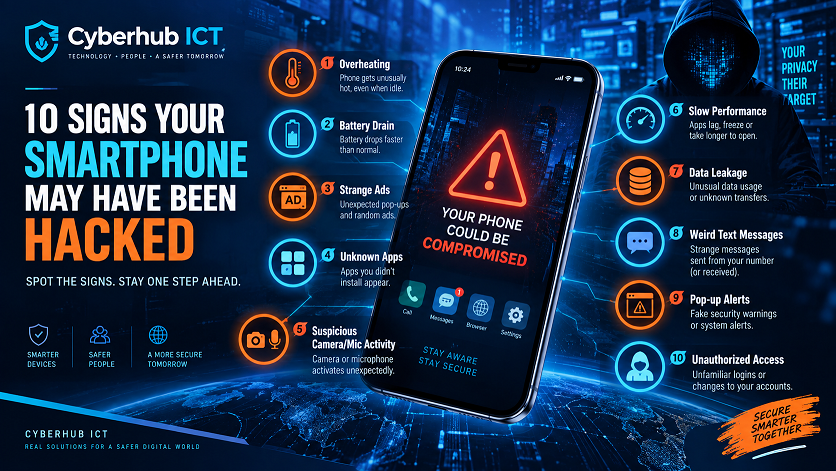
Here are 10 warning signs you should not ignore.
1. Your Battery Suddenly Drains Much Faster
Every smartphone battery gradually loses capacity as it gets older.
But if your phone normally lasts all day and suddenly begins dropping from 100% to 30% within a few hours without any major change in how you use it, investigate.
Malicious applications, spyware and other unwanted processes can sometimes continue running in the background.
This may cause additional battery consumption.
The FTC specifically identifies unusually rapid battery drain as one possible sign associated with stalkerware or monitoring software.
What to check
Open your phone’s battery settings and examine which applications are consuming the most power.
On Android, look under:
Settings → Battery → Battery Usage
On iPhone:
Settings → Battery
If an application you rarely use is consuming an unusually high percentage of your battery, investigate it.
Do not immediately assume every power-hungry application is malware. Video apps, navigation, gaming and social media can naturally use significant battery power.
2. Your Phone Becomes Hot Even When You Are Not Using It
Phones normally become warm while:
- Gaming
- Charging
- Recording videos
- Using GPS
- Making video calls
- Installing updates
But if your phone becomes unusually hot while sitting unused, something may be operating heavily in the background.
The FTC lists unexpected overheating among the possible signs of phone-monitoring software.
Check your battery and background-app activity.
If the overheating becomes severe, switch the device off and allow it to cool before continuing to use it.
3. Your Mobile Data Usage Suddenly Increases
Malicious applications sometimes need an internet connection to communicate with remote servers.
Spyware may also attempt to transmit collected information.
Therefore, unexplained increases in mobile-data consumption deserve attention.
For example, imagine that you normally use 5GB per month, but suddenly your phone consumes 15GB without you downloading large files, streaming more videos or changing your normal usage.
Check which applications are responsible.
On Android, this can usually be found under:
Settings → Network & Internet / Connections → Data Usage
On iPhone:
Settings → Cellular/Mobile Data
Look through the applications using data.
An unknown application consuming significant background data should be investigated.
The FTC also identifies unexpected increases in data usage as one possible warning sign associated with monitoring software.
4. Strange Apps Appear on Your Phone
Regularly review the applications installed on your smartphone.
If you discover an application you do not remember installing, find out what it is before opening it.
Some malicious programs may attempt to disguise themselves using innocent-looking names.
Google recommends removing Android applications that you do not trust, do not need or did not obtain from a trusted source.
Android users should also keep Google Play Protect enabled. Google says Play Protect scans applications for potentially harmful behaviour, warns users about harmful applications and may disable or remove dangerous apps.
On iPhone and iPad, Apple can also warn users when an installed third-party app is identified as containing known malware and recommends deleting such an app.
Never install random APK files simply because someone sends you a download link on WhatsApp, Telegram, Facebook or another platform.
5. You See Constant Pop-Ups and Strange Advertisements
Occasional advertisements inside free applications are normal.
What is not normal is seeing aggressive pop-ups everywhere on your phone.
Warning signs may include:
- Ads appearing when no app is open
- Browser tabs opening automatically
- Fake virus warnings
- Websites redirecting you elsewhere
- Your browser homepage changing without permission
- Your search engine mysteriously changing
Google specifically lists persistent pop-ups, unwanted tabs, browser redirects and unauthorized homepage or search-engine changes among possible signs of malware or unwanted software.
Be especially careful with warnings such as:
“Your phone has 27 viruses! Click here immediately.”
Many of these messages are themselves scams designed to frighten you into downloading something dangerous.
Do not install software simply because a website tells you that your phone is infected.
6. Your Phone Suddenly Becomes Extremely Slow
An old phone can naturally become slower over time.
Limited storage, too many background applications and ageing hardware can also affect performance.
However, unexplained and sudden performance problems deserve investigation.
Possible symptoms include:
- Apps taking unusually long to open
- Frequent freezing
- Apps crashing repeatedly
- The phone restarting unexpectedly
- Storage disappearing quickly
Google lists severe slowdowns, reduced storage and a device no longer operating properly among potential signs of harmful software.
Check your available storage and installed applications before concluding that malware is responsible.
7. Messages Are Being Sent Without Your Knowledge
This is one of the more serious warning signs.
Imagine receiving messages from friends saying:
“Why did you send me that strange link?”
But you never sent anything.
Your contacts might receive:
- Strange WhatsApp messages
- SMS messages
- Emails
- Social-media DMs
- Cryptocurrency promotions
- Fake investment opportunities
- Links asking them to vote or claim prizes
Google identifies contacts receiving messages or emails that you did not send as one potential indication of malware or account compromise.
Immediately check your accounts.
Change important passwords using a device you trust and review active login sessions.
Also warn your contacts not to click links sent from your account.
8. You Receive Unexpected Login or Security Alerts
Pay attention when Google, Apple, Facebook, Instagram, your bank or another service tells you:
“New login detected.”
If you recognize the device and location, it may simply be you.
If you do not recognize it, investigate immediately.
Other suspicious activity may include:
- Password-reset emails you didn’t request
- OTP codes arriving unexpectedly
- Your account password suddenly stops working
- You are logged out of an account without explanation
- A new device appears in your account
- Your recovery phone number or email changes
Google notes that it may sign users out of their Google Account as a protective measure when suspicious activity or harmful software is detected.
Never ignore repeated authentication codes that you did not request.
Someone may be attempting to access one of your accounts.
9. Your Camera, Microphone or Location Seems Active Unexpectedly
Modern Android phones and iPhones provide indicators when certain sensitive resources are being used.
If your microphone, camera or location services appear to activate while you are not using an application that requires them, inspect your permissions.
Check which applications have permission to access your:
- Camera
- Microphone
- Contacts
- Messages
- Location
- Files
- Photos
A legitimate application may have permission for a valid reason, so unusual permission access is not automatically proof that your phone is compromised.
The important question is:
Does this application genuinely need this permission?
For example, a calculator application probably does not need continuous access to your microphone, contacts and precise location.
Remove unnecessary permissions.
10. Strange Financial or Account Activity Appears
This is potentially the most serious warning sign.
Watch for:
- Unauthorized bank transfers
- Purchases you did not make
- Airtime disappearing
- Strange subscriptions
- Unknown mobile-money transactions
- Password changes you didn’t make
- Cryptocurrency transfers
- New beneficiaries added to financial accounts
Your phone contains access to extremely sensitive information. The FTC notes that smartphones can hold passwords, account numbers, emails, messages, photographs and other information that could be abused if an attacker gains access.
If financial activity is involved, contact your bank or payment provider immediately.
Do not wait to see whether it happens again.
What Should You Do If You Think Your Phone Has Been Hacked?
If several of these warning signs appear together, take action.
1. Disconnect From Suspicious Networks
If you believe an active attack may be occurring, disconnect from unfamiliar Wi-Fi networks.
Avoid logging into sensitive accounts over networks you do not trust.
2. Update Your Phone
Install the latest operating-system and security updates available for your device.
Software updates frequently contain important security fixes.
The FTC recommends keeping operating systems and applications updated because updates often contain critical security protections.
Apple likewise emphasizes keeping iOS updated and in April 2026 warned that malicious web content had targeted vulnerabilities in outdated iOS versions that had already been addressed through security updates.
3. Remove Suspicious Applications
Review every installed app.
If you find something unfamiliar, research it.
Remove applications you do not trust.
Android users should run Google Play Protect.
4. Change Important Passwords
Prioritize:
- Primary email
- Google or Apple Account
- Banking accounts
- Cryptocurrency accounts
- Cloud storage
If possible, change passwords from another trusted device if you believe the phone itself is seriously compromised.
Never reuse the same password across all your accounts.
5. Enable Two-Factor Authentication
Passwords alone may not provide sufficient protection.
Enable two-factor authentication or passkeys wherever available.
That way, stealing your password alone may not be enough to access your account.
6. Check Logged-In Devices
Services such as Google, Facebook, WhatsApp and Instagram allow you to review devices currently connected to your account.
Log out devices you do not recognize.
Pay particular attention to WhatsApp Linked Devices.
7. Back Up Important Files
Protect your:
- Contacts
- Photos
- Documents
- Videos
- Important messages
Having a secure backup becomes particularly important if you eventually need to reset the device.
The FTC recommends regularly backing up smartphone data so important information can be recovered if the phone is lost or compromised.
8. Factory Reset the Phone if Necessary
If serious malware problems continue after you remove suspicious applications and update the phone, a factory reset may become necessary.
Google notes that Android users who continue seeing malware symptoms may ultimately need to reset their device or seek assistance from the device manufacturer.
Back up important information first.
Be careful not to immediately reinstall the suspicious application responsible for the problem.
How Can You Prevent Your Smartphone From Being Hacked?
Prevention is usually easier than recovering from an attack.
Follow these basic rules:
Keep your phone updated.
Use a strong screen lock.
Do not share OTPs or verification codes.
Avoid suspicious links.
Download apps from trusted sources.
Review application permissions.
Enable two-factor authentication.
Keep Google Play Protect enabled on Android.
Do not connect automatically to every public Wi-Fi network.
Avoid jailbreaking or unnecessarily bypassing built-in security protections.
Apple warns that unauthorized modification or jailbreaking of iOS bypasses built-in security protections and can introduce security vulnerabilities and instability.
Don’t Panic Because of One Symptom
It is important to understand this point.
If your battery drains quickly, your phone is not automatically hacked.
If your phone becomes hot, it is not automatically hacked.
If your phone becomes slow, it is not automatically hacked.
These problems may also be caused by:
- An ageing battery
- Too many applications
- Low storage
- Software bugs
- Poor network coverage
- Background updates
- Gaming
- Video streaming
- Hardware problems
Security becomes more concerning when you notice several unexplained symptoms together, particularly unusual applications, unauthorized messages, suspicious account logins or financial activity.
Smartphone Security Checklist
Before leaving this page, take a few minutes to check your phone.
✅ Update your operating system.
✅ Update your applications.
✅ Remove applications you don’t recognize.
✅ Check battery usage.
✅ Check mobile-data usage.
✅ Review camera, microphone and location permissions.
✅ Check your Google or Apple account for unknown devices.
✅ Enable two-factor authentication.
✅ Change weak or reused passwords.
✅ Back up important files.
✅ Never share your OTP or verification codes.
✅ Avoid downloading apps from random links.
A few minutes of security checking today could prevent weeks of trying to recover compromised accounts tomorrow.
Conclusion
Smartphone hacking does not always look dramatic.
Sometimes the warning signs are small:
Your battery suddenly drains.
Your phone begins overheating.
Your data disappears unusually quickly.
Strange applications appear.
Your friends receive messages you never sent.
Your accounts begin showing unfamiliar login activity.
The key is to pay attention.
Technology should make life easier—not give criminals access to your private information.
Think before you click. Verify before you install. Protect your digital identity.
At Cyberhub ICT, we believe cybersecurity begins with awareness.
Stay informed. Stay updated. Stay secure.
About Cyberhub ICT
Cyberhub ICT Center provides ICT training and digital services covering:
- Internet & Cyber Security
- Web Design & Blogging
- Digital Marketing
- Graphics Design
- Desktop Publishing
- Content Creation
- Social Media Management
- Forex Trading
For more technology tutorials, cybersecurity guides and digital-skills content, follow Cyberhub ICT.
Website: cyberhubict.online
Email: cyberhubict@gmail.com
Phone: 08061601662
Frequently Asked Questions
How do I know for sure if my phone has been hacked?
No single symptom proves that a smartphone has been hacked. Look for combinations of unexplained behaviour such as unknown applications, unauthorized logins, messages sent without your knowledge and unusual account activity.
Does fast battery drain mean my phone has malware?
Not necessarily. Old batteries, gaming, poor network coverage and background applications can cause battery drain. However, sudden unexplained battery drain combined with other suspicious behaviour deserves investigation.
Can hackers see through my phone camera?
Malicious software with sufficient permissions can potentially abuse sensitive device capabilities. Review camera and microphone permissions and remove access from applications that do not need them.
Can factory resetting remove malware?
A factory reset can remove many forms of malicious software because it returns the device to its original state. However, you should first back up important data and avoid reinstalling suspicious applications afterward.
Should I install antivirus software on my phone?
Android already includes security protections such as Google Play Protect. Additional security software can be useful in some circumstances, but it should come from a reputable provider. Avoid random “virus cleaner” applications advertised through pop-ups.
Can someone hack my phone by calling me?
Receiving an ordinary call does not normally mean your phone has been hacked. Be more concerned when callers try to convince you to reveal OTPs, passwords, PINs or other sensitive information.
What is the first thing I should do if I notice unauthorized bank transactions?
Contact your bank or payment provider immediately, secure your accounts and change compromised credentials using a trusted device.
